Digital Humanities as Community, or Making Relationships
Debates over the definition of the Digital Humanities are by this point very clichéd, to the point that many people have begun arguing that we stop worrying about it altogether. There is a building consensus that DH, however you define it, is above all a community, or if you like a social network; specifically, a community of practice that is open, public, collaborative, and welcoming.
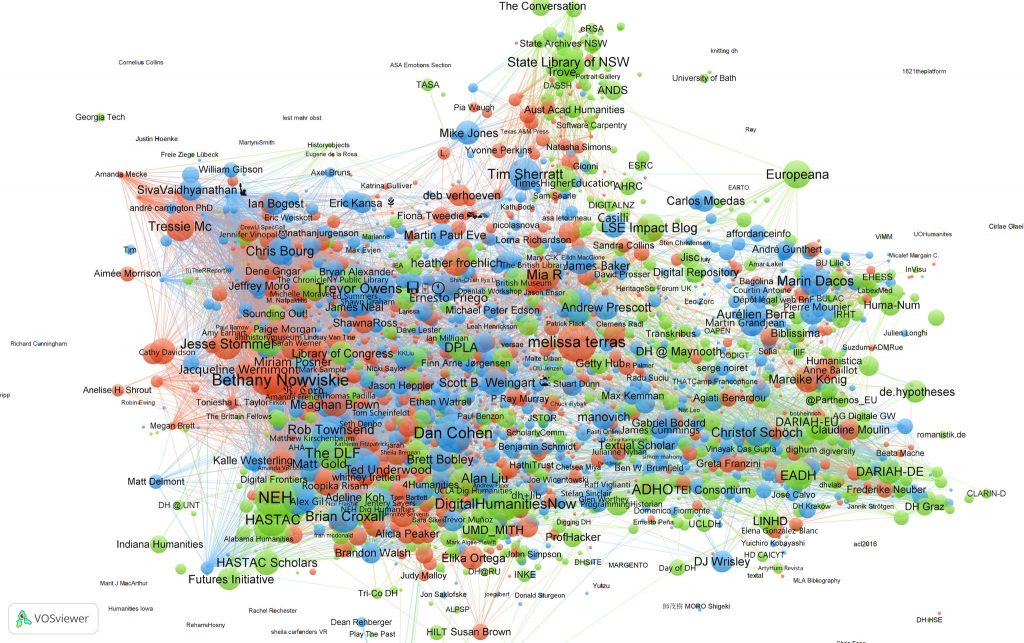
The main thing you have to do to get involved, is to just get involved. Express your interest by joining the community. One of the main ways people have done that is by blogging, posting and (historically) tweeting their ideas, projects, and questions publicly on various platforms. In the early days, Twitter was the primary vehicle for this (as illustrated by the diagram below which visualized the #DH community through a network of “co-retweets;” that is, people who like to share the same stuff).
- Click the image below for an interactive version of this network graph
- Hover over the nodes to see names and click to filter to those subnetworks. Click anywhere to unfilter
- What does this tell us about DH?
- What do the colors mean?
- What else can we do with this?
Since Elon Musk’s acquisition of Twitter (and changing of it to the almost unrecognizable X), however, an intense debate has erupted in the field about whether Twitter continues to be (or ever was) the best platform to connect and further the ethos of the DH field. Several alternatives have since emerged, with Mastodon as an early contender (as described here by Quinn Dombrowski) more recently surpassed by Bluesky as of summer 2024.
Blogging 101
But “weblogs” or blogs are the original diy progenitors of micro-blogging sites like Twitter and Bluesky, and they are still a valuable means of long-form expression, engagement and project sharing. In the DH world, the HASTAC community is a good example of a very large and long-standing network whose main connective activity continues to be its collaborative blog (despite its recent move to Humanities Commons).
Carleton accepts applications for up to two HASTAC scholars a year, who contribute to the blog and otherwise build their own networks in the DH world.
To begin to join this world, you will all be reading, writing, and sharing what we do this term on this blog and your own, which we’ll set up next week. This is not just about trying out the digital humanities. It is also about practicing skills of writing for the public and controlling your digital identity that will serve you well beyond your college career no matter what you choose to do. Having control over your internet presence is crucial in this day and age, and building your own website is one of the best ways to craft and maintain a public, online identity.
In Class Exercises
Your first post will be on your process and experience with 3D modeling.
Posting to the Blog
For starters, you’ll register for this class site so you can comment on assignments, post to the blog and get familiar with the WordPress interface, if you aren’t already.
Follow these instructions to register for our course site and post your first comment.

Good? Once you’ve done all that…
Lab Assignment 1 (continued): 3D Modeling Post Instructions
- Open the Google Drive folder where you stored the exported images of your object model (instructions are here if you’ve forgotten).
- Log in to this Hacking the Humanities class blog, if not already
- Make a new post sharing several 2D images of your house that you exported from Fusion 360
- Make sure to caption the images appropriately and include Alt Text for accessibility
- In the accompanying text tell us about your process.
- How easy/hard was it?,
- What elements particularly bogged you down?,
- What compromises did you have to make?
- Most importantly: what humanistic uses can you envision for 3D modeling in the areas of research or teaching? Fusion is just one tool that can be used to do this type of work — reflect beyond the specifics of this tool, to the area of inquiry more broadly. How can 3D modeling be useful for humanities scholarship and public engagement?
- Make sure to also share a tip for other novice Fusion 360 users about the tool that you found most useful, or a technique that you wish you had figured out sooner. Part of the digital maker philosophy is sharing the knowledge you gained, so make sure to pass it on.
- Finally, embed an interactive viewer of the Fusion 360 model in your post. This will allow others to interact with your model and is good practice for web-based DH visualization tools.
- Log into autodesk and copy the embed code following their embed instructions here.
- Add an HTML Block to your wordpress post and past the embed code into it. It should look something like this.
<iframe src="[URL]"
width="800" height="600" allowfullscreen="true"
webkitallowfullscreen="true" mozallowfullscreen="true"
frameborder="0"></iframe>
- Categorize your post with Lab Assignment and the appropriate Week (e.g. Week 1)
- Add any free Tags that you think relevant
- Publish!
Congratulations! You have posted your first lab assignment post and can now share your interests and knowledge with the world.
Finally, read and comment on two of your classmates’ 3D modeling posts and
submit links to all three to Moodle as
- Lab Assignment Week 1,
- Comment 1 Week 1, and
- Comment 2 Week 1
We barely scratched the surface of what you can do with this platform in class, but we will get deeper into the weeds next week as you set up your own WordPress instance with complete administrative control.
Resources
Carleton College’s own web services group has a lot of good resources for how to write for the web effectively.
Reflective Blog Post (due Friday)
Now that you’ve read more about Digital Humanities and tried your hand at making something, I want to hear your reflections on how you see your past experiences and current interests intersecting with this field.
Choose a quotation that resonated with you from one of the readings assigned for today and write a reflective blog post that answers the following questions:
- Why did this particular passage grab your attention?
- What elements of your past experiences, current interests, or future plans did it kindle?
- Under the large umbrella of Digital (Arts &) Humanities, which areas of inquiry, methods or techniques are you most eager to pursue this term and why?
Start your blog post with a Quote block and citation as in the example below
Digital Humanities is born of the encounter between traditional humanities and computational methods.
Burdick et al. “One: From Humanities to Digital Humanities,” in Digital_Humanities (Cambridge, MA: MIT Press, 2012), 3.
As you write, remember that blog writing is a different beast that lies somewhere between formal academic writing and casual social media or email style. Try for a tone that is scholarly and informed but neither too stiff nor too sloppy. It can be a tough balance to strike, but think of your intended audience and try to find a voice that works for you.
- Categorize your post with Blog and the appropriate Week (e.g. Week 1)
- Add any free Tags that you think relevant
- Publish!
Submit the link to Moodle as
- Blog Week 1

wrong spot
wrong spot